HVAC Service Software for Field Technicians & Office Teams
March 5, 2026
Running an HVAC business is like trying to conduct an orchestra where half the musicians are in another city.
Technicians are out on the field, office staff is handling scheduling and invoices, and customers expect fast, reliable service. And, when communication breaks down between field and office, even small missteps can snowball into big problems.
For many HVAC businesses, this is a daily challenge. Paperwork piles up, job notes get lost, and phone calls turn into endless follow-ups. Technicians feel disconnected, office staff are constantly chasing information, and customers notice the delays.
When this information is lost between these teams it becomes stressful, inefficient, and expensive. But it doesn’t have to be this way, as it’s about keeping your entire operation in sync.
How HVAC Service Software Connects Field Technicians & Office Teams
HVAC service software is a centralized platform that unifies field technicians, office staff, and customer interactions, replacing scattered tools and manual processes. Every job, from scheduling to invoicing, is tracked, updated, and accessible in real time.
By bridging the gap between field and office, it ensures faster updates, smoother operations, and a better customer experience, reducing delays, errors, and missed opportunities.
Designed for HVAC business managers, team leads, office staff, and technicians, it helps improve technician productivity, streamline scheduling and dispatch, and deliver reliable service to both residential and commercial clients.
But it has more to it. Therefore, this blog explains how HVAC service software solves the field–office disconnect, highlights the features HVAC companies need, and shows how to leverage a unified workflow to grow your business and deliver professional service every time.
Key Takeaways:
- Unified HVAC software keeps technicians, office staff, and customers on the same page, preventing missed updates and delays.
- Scheduling, dispatch, invoicing, and reporting all happen in one platform, saving time and reducing errors.
- Mobile-friendly tools and real-time job data let techs focus on work, not paperwork.
- Faster responses, clear communication, and fewer repeat visits build trust and loyalty.
- From small teams to large commercial operations, centralized software supports growth while keeping operations efficient and professional.
Ready to stop chasing updates and keep your field and office teams perfectly in sync? Schedule a demo with HVACBase and get every job, schedule, and invoice flowing seamlessly between field and office.
Why HVAC Businesses Still Struggle With the Field–Office Disconnect?
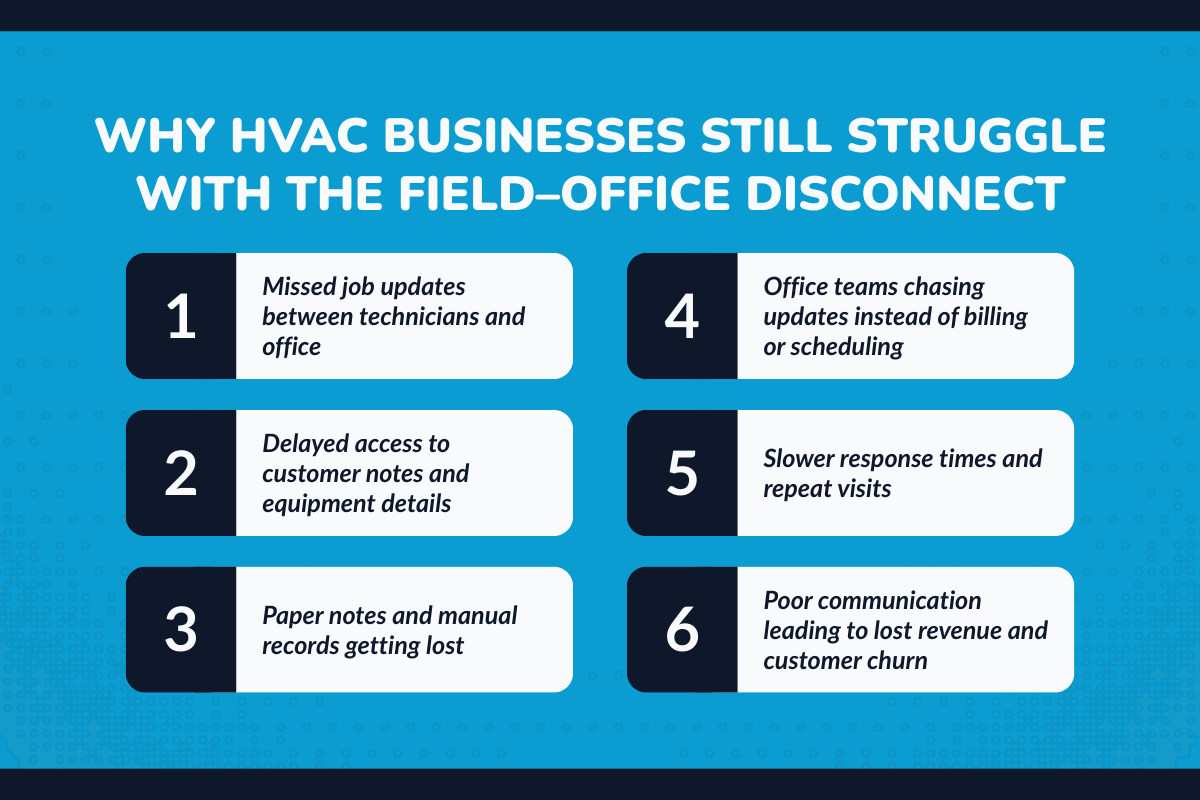
Even seasoned HVAC managers know the pain: technicians are on-site, office staff is juggling customer calls, and suddenly, something falls through the cracks. Jobs are delayed, customers are frustrated, and invoices are late. This isn’t just annoying, it’s costly.
1. What actually breaks down between technicians and the office?
Communication between field techs and office staff often hits small but costly roadblocks:
- Missed updates: Job changes or completions don’t reach the office in time, causing scheduling confusion.
- Delayed job details: Critical info like customer notes or equipment specifics arrives too late, leaving techs unprepared.
- Paper notes that never sync: Handwritten notes get lost or forgotten, creating incomplete service records.
- Manual follow-ups: Office staff spend hours chasing updates instead of focusing on scheduling, billing, or customer care.
Even small breakdowns like these add up, slowing operations and frustrating customers.
2. How the disconnect affects customer satisfaction and revenue
When field and office aren’t aligned, customer satisfaction drops: slower response times, repeat visits, and delayed billing. Studies show 25% of customers switch providers after poor communication. For HVAC businesses, that’s lost revenue and trust.
What Field Technicians Actually Want From HVAC Software?
Most technicians don’t care about “software features.” They care about whether a tool makes their day easier or harder. If an HVAC system slows them down, forces extra typing, or feels like office surveillance, it gets ignored fast.
What technicians really want is simple: less friction between the job and getting it done.
1. Less paperwork, more actual work
Technicians spend enough time fixing systems. They shouldn’t spend evenings updating reports or re-entering the same details twice. With the right HVAC software:
- Job updates happen once, directly from the field
- No duplicate reporting between paper notes and office systems
- Work is logged as it happens, not hours later
That alone saves time, energy, and frustration.
2. Mobile-friendly workflows that work onsite
Field work doesn’t happen at a desk. Technicians need tools that work reliably on-site, not clunky systems designed only for office screens. A good HVAC mobile app gives technicians:
- Clear job details before arriving at the job site
- Easy access to customer history and past service records
- Equipment details and service scope in one place
When technicians arrive informed, jobs move faster, and confidence goes up.
3. Clear expectations for every service call
Nothing frustrates a technician more than an unclear scope or missing information. HVAC service software helps by:
- Showing exactly what needs to be done
- Reducing back-and-forth calls with the office
- Making every residential job feel organized, not rushed
When expectations are clear, technicians can focus on quality work instead of damage control.
Simplify your daily operations and never chase technicians again with Field Service Software.
What Office Teams Gain From HVAC Business Software?
Office teams carry the operational weight of the business. It becomes bottleneck when scheduling, customer communication, invoicing, and follow-ups, becomes disconnected.
But a centralized HVAC management software along with reducing the workload, also restores control without micromanaging. This is how:
1. Full visibility without chasing technicians
Instead of calling technicians for updates, office teams can see what’s happening in real time.
That includes:
- Job progress at a glance
- Technician availability throughout the day
- Schedule changes without confusion
This visibility helps teams plan better without interrupting field work.
2. Cleaner operations and smarter decisions
When data is scattered, decisions are reactive, when data is centralized, decisions become strategic.
Thus, with unified HVAC software solutions, office teams gain:
- Performance insights across technicians and jobs
- Revenue tracking is tied directly to completed work
- Bottleneck identification before issues escalate
Industry benchmarks show that HVAC businesses using centralized systems can improve operational efficiency by 20–30% simply by reducing delays, rework, and manual coordination. The office shifts from firefighting to running the business.
How Unified HVAC Service Software Connects Field Technicians and Office Teams?

In many HVAC businesses, the field and office aren’t disconnected because people don’t care; they’re disconnected because systems don’t talk to each other.
Unified field service management software solves that by creating one shared source of truth for the entire business.
1. Real-time communication without phone tag
Unified HVAC software removes the need for constant phone calls and message chasing. When technicians update a job in the field such as marking arrival, adding service notes, or reporting an issue those updates instantly appear in the office dashboard.
At the same time, any changes made by the office, like schedule adjustments or priority updates, reach technicians immediately on their mobile devices.
2. One shared job timeline from dispatch to invoice
With a unified system, every job follows a single, connected timeline from the moment it’s scheduled to the moment it’s invoiced.
Job details, customer information, and service notes stay linked throughout the entire process instead of being re-entered into different tools. This eliminates duplicate data entry and reduces the chance of missing or incorrect information.
3. One system supporting the entire business
The most effective HVAC software goes beyond job management and supports the full operation. It brings together scheduling and dispatch, customer communication, inventory and parts usage, and reporting into one system.
Office teams can see technician availability and job progress, while field technicians can access customer details, parts information, and service history on-site.
Tired of delays and miscommunication? Bring your field and office teams together in one unified system.
Signs Your HVAC Company Has Outgrown Manual Processes
1. Reliance on calls, texts, or WhatsApp for updates: When job updates depend on calls, texts, or WhatsApp messages, information gets scattered and easily missed. This leads to confusion between the office and field teams, especially when multiple jobs are active at the same time or technicians are busy on-site.
2. Invoices are sent days after completion: If invoices are created days after the job is completed, it usually means job details aren’t flowing smoothly from the field to the office.
3. Office chasing technicians constantly: When office staff spend a large part of their day calling technicians for updates, photos, or job notes, it signals a lack of real-time visibility. This reactive coordination wastes time on both sides and pulls technicians away from actual service work.
4. Customers asking questions you can’t quickly answer: If customers frequently ask about job status, technician arrival times, or service history and the office can’t answer instantly it shows that customer information isn’t centralized. This hurts trust and makes the business appear disorganized, even when the work itself is solid.
What Are The Key Features HVAC Companies Actually Need
Not all features are created equal. Some software is flashy but doesn’t solve real problems. Here’s what HVAC businesses actually need to run efficient operations and delight customers.
1. HVAC dispatch software that reduces chaos
- Smart technician assignment: Instead of guessing who should take the next job, smart dispatching matches work based on technician skills, availability, and current workload.
- Location-based dispatching: Assigning jobs based on real-time location helps technicians spend less time driving and more time completing service calls. Shorter travel times lead to tighter schedules and more jobs completed per day.
- Emergency job handling: Urgent breakdowns and same-day service requests are part of HVAC work. Good dispatch software allows office teams to reroute technicians quickly without throwing the entire day off track.
2. HVAC scheduling built for real service days
- Drag-and-drop scheduling: A visual scheduling calendar allows office staff to move jobs easily when customers reschedule or technicians run late.
- Last-minute changes without disrupting the day: Cancellations, delays, and urgent calls happen daily. Flexible scheduling tools let teams adjust on the fly while still protecting previously planned appointments.
- Full visibility for office staff and HVAC techs: When everyone sees the same schedule in real time, confusion disappears. Technicians know where they’re going next, and office teams can answer customer questions instantly.
3. HVAC estimating software that speeds up approvals
- On-site estimates and professional proposals: When technicians can generate estimates during the visit, customers don’t have to wait days for pricing. Clean, professional proposals build trust and keep the buying decision moving forward.
- Pre-built service templates: Templates ensure pricing consistency across technicians and prevent important items from being missed. This protects margins while making estimates faster to create.
- Jobs close faster when estimates are sent immediately: Speed matters. Sending estimates right after the inspection keeps the conversation fresh and reduces the chance of customers shopping around or losing interest.
4. HVAC invoicing software that gets you paid faster
- Automatic invoice generation: Invoices created automatically after job completion remove delays and reduce admin work. The faster invoices go out, the faster payments come in.
- No missing line items: When invoices pull directly from job details and estimates, nothing gets forgotten. This prevents underbilling and avoids uncomfortable follow-up conversations later.
- Integrated payment processing for faster cash flow: Allowing customers to pay instantly by card or online transfer removes friction. Faster payments improve cash flow and reduce time spent chasing outstanding invoices.
5. HVAC accounting software integration for clean books
- Sync invoices with accounting systems: Connecting HVAC software with tools like QuickBooks Online or ERP systems ensures financial data stays accurate without manual uploads or corrections.
- Reduce duplicate entries: Automation eliminates the need to enter the same data multiple times across systems. This reduces errors and saves hours of admin work each week.
- Improve visibility into financial operations: When job costs, revenue, and payments are visible in one place, business owners can make better decisions. Clear financial data supports growth without surprises.
When you have a growing business, you should discover HVAC Service Software Features Modern Companies Can’t Operate Without.
Top 5 Best Unified HVAC Service Software in 2026
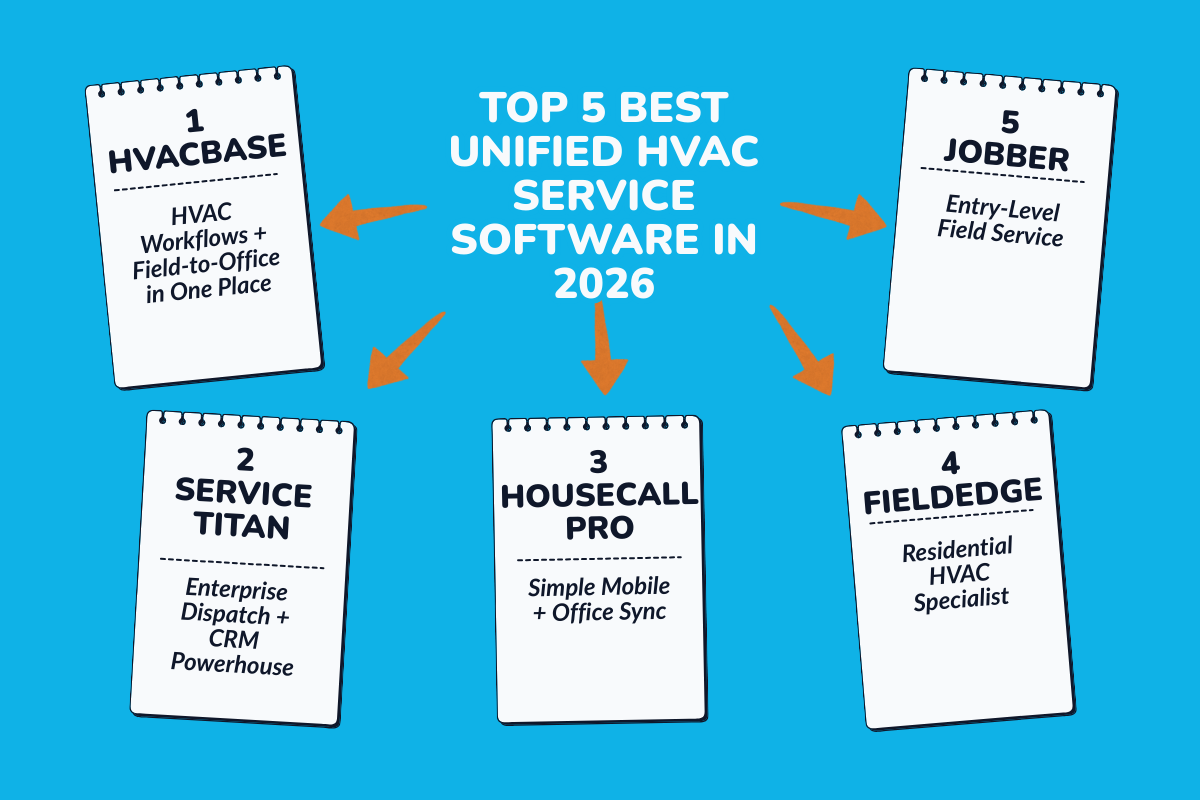
The "best" unified HVAC service software depends on your team size, commercial vs. residential focus, mobile needs, and how tightly field operations connect with office workflows. Below is a manager-friendly breakdown of the top platforms that serve both field technicians and office teams in a single system.
1. HVACBase: HVAC Workflows + Field-to-Office in One Place
HVACBase takes an HVAC-specific approach by combining mobile field service, dispatch, CRM, maintenance contracts, and profitability tracking. Instead of generic field service tools, it's built for HVAC technicians who need load calculations, equipment history, and service workflows that actually match real HVAC jobs.
Best for: Small to mid-size HVAC companies (1–25 techs) wanting HVAC-specific features without enterprise complexity or multiple apps.
Key features:
- HVAC load calculations built into mobile app: Technicians access Manual J-compliant calculations directly on-site, eliminating external software and speeding up service calls.
- Maintenance contract tracking with auto-renewals: Automatic alerts for upcoming service visits and renewal notifications keep revenue predictable without manual spreadsheets.
- Parts & inventory tied to specific equipment: Track parts usage against individual HVAC units (not generic SKUs), reducing stockouts during repairs.
- Real-time dispatch board with tech skills & GPS: Office sees live locations, certifications, and availability for smarter job assignments.
- Profitability reports by job type and technician: Managers track which services and techs deliver best margins, with no complex setup needed.
Pricing: custom pricing
Why teams choose it: Eliminates "app overload" while delivering HVAC-specific tools that generic platforms lack. Managers get unified visibility and techs get simple mobile tools.
2. ServiceTitan: Enterprise Dispatch + CRM Powerhouse
ServiceTitan dominates large HVAC operations with advanced dispatching, upsell tools, and comprehensive reporting.
Best for: Enterprise HVAC companies (25+ techs) with complex multi-crew operations.
Key features:
- Advanced drag-and-drop dispatch board: Real-time tech assignment with skills matching and territory optimization.
- Built-in upsell prompts during service calls: Mobile notifications suggest add-on services based on job history.
- Deep financial reporting and job costing: Track profitability by technician, service type, and customer segment.
- Customer portal with service history access: Clients view invoices, schedules, and maintenance records online.
Pricing: It offers custom enterprise pricing, G2 reviews 2026
Why teams choose it: Unmatched scale for large operations, but requires significant setup time and budget.
3. Housecall Pro: Simple Mobile + Office Sync
Housecall Pro is designed for service businesses that want their field technicians and office staff working in sync without dealing with complex systems. It focuses on clean mobile apps for technicians and straightforward tools for office teams, making it easy to adopt without heavy training.
Best for: Small-mid HVAC teams (1–15 techs) wanting simplicity over deep customization.
Key features:
- Live GPS tracking with customer ETA updates: Automatic notifications reduce no-shows and improve satisfaction.
- QuickBooks Online seamless integration: The platform integrates directly with QuickBooks Online, allowing invoices, payments, and customer records to sync automatically.
- Digital signatures and on-site payments: Housecall Pro enables technicians to collect digital signatures and accept payments directly from the field.
- Basic scheduling calendar: Simple drag-and-drop for small team coordination. Office staff can quickly assign jobs, move appointments, and see technician availability at a glance.
Pricing:
- Basic: $59/month
- Essentials: $149/month
- Max: $299/month
Why teams choose it: Fast onboarding for general field service, but it lacks HVAC-specific depth like load calculations.
4. FieldEdge: Residential HVAC Specialist
FieldEdge focuses on residential service with strong maintenance contract tools.
Best for: Residential HVAC companies emphasizing service contracts over commercial work.
Key features:
- AMC tracking with automated reminders: Service history and renewal alerts built for residential contracts.
- Mobile job cards with photo documentation: Techs capture before/after images and notes on-site.
- Equipment history per customer address: Tracks equipment history at the address level, and at the customer level. This means every HVAC unit installed or serviced at a property has its own service timeline.
- Basic dispatch and technician reporting: Managers can see which technicians are assigned, what jobs are completed, and how the day is progressing.
Pricing: FieldEdge uses custom pricing based on business size and feature requirements. Most residential HVAC companies report pricing in the range of $150–$250 per month, depending on the number of users and selected modules.
Why teams choose it: Reliable residential focus, but the interface feels dated compared to modern platforms.
5. Jobber: Entry-Level Field Service
Jobber serves very small teams with basic scheduling and invoicing.
Best for: Solo techs or 1–5 person teams starting with field service software.
Key features:
- Simple drag-and-drop scheduling: Jobber provides a visual, drag-and-drop calendar that makes it easy to assign jobs and see the day at a glance.
- Client portal for self-service: The client portal allows customers to view quotes, invoices, and upcoming appointments on their own.
- GPS route optimization: It includes basic GPS routing that provides turn-by-turn directions between jobs helping technicians move efficiently from one location to the next.
- Payment collection through mobile app: Technicians can collect payments directly from the field using Jobber’s mobile app. Credit card processing allows jobs to be closed on-site, reducing delayed payments and follow-up calls.
Pricing: Jobber offers tiered pricing based on features and team size:
- Core: $25/month
- Connect: $75/month
- Grow: $126/month
These plans are positioned to be accessible for new businesses and small teams transitioning into field service software for the first time.
Why teams choose it: Affordable entry point, quickly outgrown by growing HVAC businesses.
How to Choose the Right HVAC Service Software
Choosing the right software is crucial. Ask yourself:
1. Questions every HVAC manager should ask
- Does it support real-time communication?
- Is it built specifically for HVAC service workflows?
- Will technicians actually use it?
2. Make Sure Technicians Can Use It Easily
If technicians struggle to use the app, the software will fail—no matter how powerful it is. The mobile app should be quick to open, easy to navigate, and simple to update jobs on the go. When the software feels natural, technicians actually use it instead of avoiding it.
3. Confirm Office and Field Stay in Sync
Office teams and technicians should always see the same information. When a schedule changes or notes are added, updates should appear instantly on both sides. This prevents confusion, repeat calls, and missed details.
4. Check If Reports Are Actually Useful
Reports should help you make better decisions, not just show numbers. Look for insights into job completion times, repeat visits, technician workload, and revenue trends, so you can improve operations over time.
Conclusion
At the heart of every successful HVAC industry business is one simple thing: alignment. When field technicians and office teams work from the same information, everything else falls into place. Jobs move faster, mistakes drop, invoices go out on time, and customers feel the difference immediately.
Unified HVAC field service software brings that alignment to daily operations for HVAC contractors and managers. It replaces scattered tools and guesswork with a single, reliable system that supports scheduling, communication, job tracking, and billing from start to finish. Technicians arrive prepared, office teams stay in control, and managers gain clarity across the entire business.
This isn’t about adding more software; it’s about removing friction. When your systems work together, your people can focus on delivering consistent, professional service that keeps customers coming back and allows your HVAC business to grow with confidence.
About HVACBase
HVACBase is designed to bring every part of your HVAC business onto a single, unified platform. Field technicians, office staff, and managers can see schedules, job details, and customer information in real time, eliminating missed updates, duplicate work, and delays. By centralizing dispatch, invoicing, and reporting,
HVACBase helps your team work smarter, respond faster, and keep customers happier.
Streamline jobs, schedules, and invoices with HVACBase. Schedule a call and take control of your operations today.
FAQs
1. What is HVAC service software used for?
HVAC service software helps HVAC businesses manage scheduling, dispatch, job tracking, invoicing, and customer communication in one system. It connects field technicians and office teams in real time, reducing manual work and preventing missed updates, delays, and billing errors across daily operations.
2. How does HVAC software improve communication between field and office teams?
HVAC software keeps everyone working from the same job information. Technicians update job status from the field, and office teams see changes instantly without phone calls or follow-ups. This real-time communication reduces confusion, speeds up decisions, and keeps customers informed throughout the service process.
3. Is HVAC service software useful for small HVAC businesses?
Yes. Small HVAC businesses often benefit the most because software replaces spreadsheets, paper notes, and manual coordination. Even with a small team, centralized scheduling, invoicing, and customer records save time, reduce errors, and help the business scale without adding administrative overhead.
4. What features should HVAC technicians look for in HVAC software?
Technicians should look for mobile-friendly workflows, clear job details, access to customer history, equipment information, and the ability to update jobs on-site. Good HVAC software reduces paperwork, avoids duplicate reporting, and lets technicians focus on service instead of administrative tasks.
5. How does HVAC business software help improve customer satisfaction?
Customer management tools in HVAC business software improve customer satisfaction by speeding up response times, reducing missed appointments, and keeping service details accurate. When technicians arrive prepared and invoices are sent quickly, customers experience smoother service, clearer communication, and fewer follow-ups or misunderstandings.
6. Can HVAC service software help with invoicing and payments?
Yes. HVAC service software allows technicians to capture job details on-site and send invoices directly after completion. This reduces billing delays, eliminates missing information, and helps businesses streamline operations and get paid faster while maintaining accurate financial records for both residential and commercial jobs.
Have questions or need personalized advice?
Talk to an Expert Today and let our construction specialists guide you to success.
Related Posts