HVAC Service Software Buyer’s Guide: What to Evaluate Beyond the Demo (2026 Edition)
August 7, 2026
An HVAC service software demo can look impressive without ever proving the platform will hold up on a busy service day.
Scheduling, dispatch, customer management, invoicing, and the mobile app all get shown off in a controlled setting, but that doesn't confirm whether dispatchers can handle a last-minute emergency call or whether technicians can actually use the app in the field without it slowing them down.
This guide covers what to evaluate beyond the demo, including complete workflows, integrations, reporting, implementation, and total cost, so HVAC businesses can choose software that works under real operating conditions.
HVAC Service Software: What to Evaluate Beyond the Demo
Switching HVAC service software is expensive in more than just dollars. It means re-migrating customer and equipment history, retraining every department, and risking weeks of disrupted scheduling and invoicing while the team adjusts.
That's what makes the evaluation stage worth slowing down for. Below, we cover how to define what your business actually needs, test complete workflows with the people who'll use them daily, and compare vendors on evidence rather than promises.
Key Takeaways
- Evaluate complete HVAC service workflows rather than isolated features.
- Test the mobile app, scheduling, dispatch, customer communication, and payment processing with the employees who will use them.
- Verify integration behavior, data access, reporting, implementation, and support.
- Compare total cost and adoption risk—not only the subscription price.
- The best HVAC software should match the company’s current operating model and expected growth.
Put HVACBase to the Workflow Test
See how HVACBase handles your real scheduling, dispatch, field service, invoicing, and maintenance workflows, not just a polished feature tour.
Get a personalized walkthrough!
Define What Your HVAC Business Actually Needs
Before comparing software solutions, document the work the platform must support, the problems it must solve, and the outcomes it must deliver. This gives HVAC companies a clear basis for evaluating vendors instead of reacting to whichever features look most impressive.
Start With Your Operating Model
Define the structure of your business across three areas:
- Work mix: Residential, commercial HVAC, or both; routine service and repair; emergency calls; equipment replacements; and multi-day installations
- Customer and contract model: One-time customers, commercial clients with multiple service locations, and preventive maintenance or service agreements
- Operating structure: One or multiple branches, the number of technicians and office employees, and the departments involved in completing each job
These differences determine what HVAC business software must handle. A residential service company may primarily need scheduling, customer management, estimates, invoicing, and payment collection.
Commercial HVAC contractors may also require asset histories, contract entitlements, project management, progress billing, and detailed job costing.
Operational complexity matters more than headcount. A smaller contractor managing multiple locations, agreements, and installation projects may need more advanced capabilities than a larger company completing straightforward residential service calls.
Map the Workflows Creating the Most Friction
Select three to five high-friction workflows, such as emergency dispatch, repair approval, agreement renewal, replacement installation, or job closeout.
For each workflow, document the current process, the main failure point, and the required outcome.
| Workflow | Current Problem | Required Outcome |
|---|---|---|
| Emergency dispatch | Schedule changes create conflicts and require multiple calls | Reassign a qualified technician without rebuilding the day |
| Service agreement renewal | Renewal dates are tracked manually | Identify upcoming renewals and trigger follow-up automatically |
| Job closeout | Accounting waits for paperwork from the field | Transfer completed work and costs directly into invoicing |
This creates a requirements brief that vendors can be evaluated against consistently.
Rank Requirements by Operational Priority
Requirements should come from everyone affected by the software, including:
- Customer service representatives and dispatchers
- HVAC technicians
- Sales representatives and estimators
- Service, installation, and project managers
- Accounting staff
- Owners and administrators
Classify each requirement as:
- Must-have: Essential to completing a core workflow
- Important: Creates meaningful value but has an acceptable temporary workaround
- Nice-to-have: Useful, but not essential to current operations or the buying decision
Write each requirement as an operational outcome. Instead of stating, “The platform needs dispatch software,” specify, “Dispatchers must be able to add an emergency call, identify a qualified nearby technician, and notify the customer without creating a scheduling conflict.”
A missing must-have should not be offset by several low-value features. The completed requirements brief should become the basis for every product demonstration and vendor comparison.
Evaluate Complete HVAC Service Workflows: Not Isolated Features
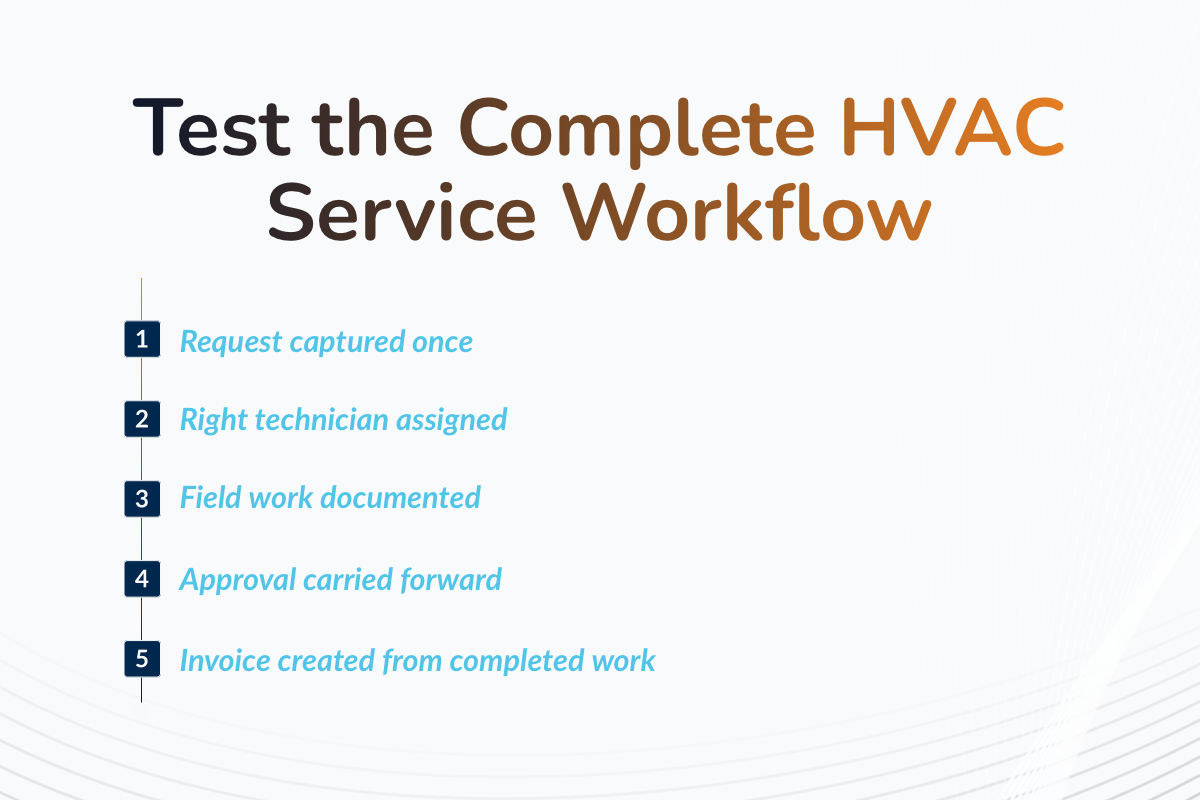
A useful HVAC service software demo should follow complete workflows from customer intake through field execution, payment, and follow-up. It should also include exceptions because operational fit becomes clearest when the work deviates from the ideal path.
The goal is to determine whether each workflow can move between employees and departments without lost information, duplicate work, or manual re-entry.
Customer Calls, Online Booking, Scheduling, and Dispatch
Ask the vendor to run two scenarios: a routine request from a new customer and an emergency call added to an already-full schedule.
The demonstration should show how the system:
- Captures requests from customer calls and online booking without creating duplicate records
- Matches jobs by technician skill, certification, location, and availability
- Detects scheduling conflicts before work is assigned
- Inserts or reassigns an urgent job without rebuilding the entire schedule
- Uses GPS tracking and route optimization to support dispatch decisions
- Sends changes to the technician and customer with scheduling software
- Gives the office real-time visibility into job progress
GPS and route optimization should support dispatch decisions, not operate as isolated maps. Test whether location, qualifications, workload, job status, and customer communication update together when work is reassigned.
Pass/fail question: Can the HVAC dispatch software add and reassign an emergency job without creating a conflict, losing job details, or disrupting customer communication?
Customer Management and Communication
Customer management should provide one reliable record for every customer, location, and piece of equipment.
Evaluate whether the customer relationship management system can:
- Maintain customer information, equipment records, warranties, and service history
- Connect calls, estimates, work orders, invoices, and payments
- Preserve a shared communication log for office and field employees
- Automate confirmations, reminders, and service-status updates
- Provide a customer portal for requests, approvals, and payments
The record should remain consistent across the workflow. An HVAC technician should not need to ask what happened during the previous visit when that information already exists elsewhere in the company.
HVAC companies should also review how automated communication is controlled. Check who can edit templates, when notifications are sent, how customers provide consent, and whether employees can see the message history. Automated updates can support a better customer experience, but duplicated or poorly timed messages can create confusion.
Pass/fail question: Can every authorized employee access the same customer and service information while the company retains control over what customers receive?
Technician Mobile Workflow
HVAC technicians, not only managers or salespeople, should test the mobile app on the type of device the company plans to deploy.
Ask a technician to complete the main stages of a service call:
- Review the schedule, job details, equipment records, and service history
- Complete a digital work order or checklist
- Record notes, photos, diagnostic findings, and parts used
- Update the job status and communicate a delay to dispatch
- Create an estimate, capture approval, and obtain an e-signature
- Close the work order, send an invoice, and collect payment
Pay attention to the number of screens, repeated entries, and office calls required.
HVAC field service software should make it easier to complete and document work from the jobsite, not recreate a complicated desktop system on a smaller screen.
- Offline access is one of the most important considerations when evaluating what technicians need in the field. Disconnect the mobile device, complete part of the work order, add photos and notes, and reconnect it.
- Verify what remains available without a signal, when the work syncs, and how the system handles updates made by the office in the meantime.
Pass/fail question: Can a technician complete and document the job without paperwork, unnecessary office calls, or a dependable internet connection?
Estimates, Proposals, and Approvals
An estimate becomes operationally useful only when its approved scope can move into job execution.
Ask the vendor to demonstrate:
- Creating a repair or replacement estimate from the field
- Updating labor, material, equipment, tax, and markup data
- Presenting multiple options in a branded proposal
- Applying discount and minimum-margin controls
- Collecting approval and an e-signature
- Revising the estimate while preserving earlier versions and approvals
Once the customer accepts an option, the selected scope, prices, materials, and customer information should carry into the work order or installation project. The same information should then be available for job scheduling, job costing, and invoicing without manual data entry.
Include one exception: revise the scope after initial approval and verify that the HVAC software preserves both the original authorization and the updated agreement.
Pass/fail question: Can an approved estimate become scheduled, executable, and billable work without recreating the job?
Maintenance Agreements and Recurring Service
Repeating an appointment is not the same as managing a complete service agreement.
Ask the vendor to demonstrate how the HVAC management software:
- Connects an agreement to the correct customer, location, and equipment
- Records covered services, discounts, visits, and other entitlements
- Generates recurring work orders and seasonal maintenance reminders
- Tracks completed and remaining visits
- Applies the correct billing rules
- Measures agreement profitability and identifies upcoming renewals
Test exceptions as well. Pause an agreement, miss a scheduled visit, change the covered equipment, and then cancel or renew the contract. Future work and billing should update without erasing the agreement’s history.
This distinction is particularly important for preventive maintenance contracts. Basic job scheduling may repeat a visit every six months without tracking what the customer purchased, which equipment is covered, or whether the agreement remains active.
Pass/fail question: Can the service management system maintain the full agreement lifecycle, including entitlements, visits, billing, changes, and renewal?
Installations, Inventory, and Job Costing
HVAC software that handles individual service calls may not necessarily support replacements, multi-day installations, or commercial HVAC projects.
Evaluate three connected areas:
- Project execution: Multi-day scheduling, project stages, crews, subcontractors, and change orders
- Materials and procurement: Equipment allocation, truck and warehouse inventory management, purchase orders, and replenishment
- Financial control: Labor tracking, deposits, progress billing, estimated-versus-actual costs, and final profitability
Before assigning work, the office should be able to confirm whether the required equipment and parts are available. Materials used in the field should then post to the correct job rather than being reconciled later in a separate spreadsheet.
Job costing should connect labor, materials, equipment, purchases, and approved changes so contractors can compare estimated and actual performance. Add an unplanned material requirement or change order and verify that inventory, approval, billing, and expected margin update together.
Pass/fail question: Can the field service management software control both the operational and financial complexity of work that extends beyond one service call?
Invoicing, Payment Processing, and Accounting
A completed work order should produce an accurate invoice without requiring the office to reconstruct what happened in the field.
Evaluate whether the platform’s HVAC invoicing and accounting workflow can move completed work into an accurate invoice and synchronize the transaction with the company’s accounting system.
Ask the vendor to demonstrate how the system:
- Transfers completed work, materials, labor, and approved changes into the invoice
- Allows technicians to create and send invoices from the field
- Applies deposits, discounts, taxes, refunds, and financing correctly
- Accepts the payment methods the company intends to offer
- Posts service-agreement charges according to the agreed billing schedule
- Transfers invoices, payments, and job costs to QuickBooks Online or another accounting system
Processes one adjustment or refund during the demonstration to confirm that the customer balance, payment record, and invoice remain aligned.
At this stage, focus on whether the transaction can be completed correctly. Processing rates, add-on costs, and contract terms should be compared later as part of the total cost of ownership.
Pass/fail question: Can the company move from completed work to collected and recorded revenue without rebuilding or manually correcting the transaction?
Verify Integration Depth and Data Control
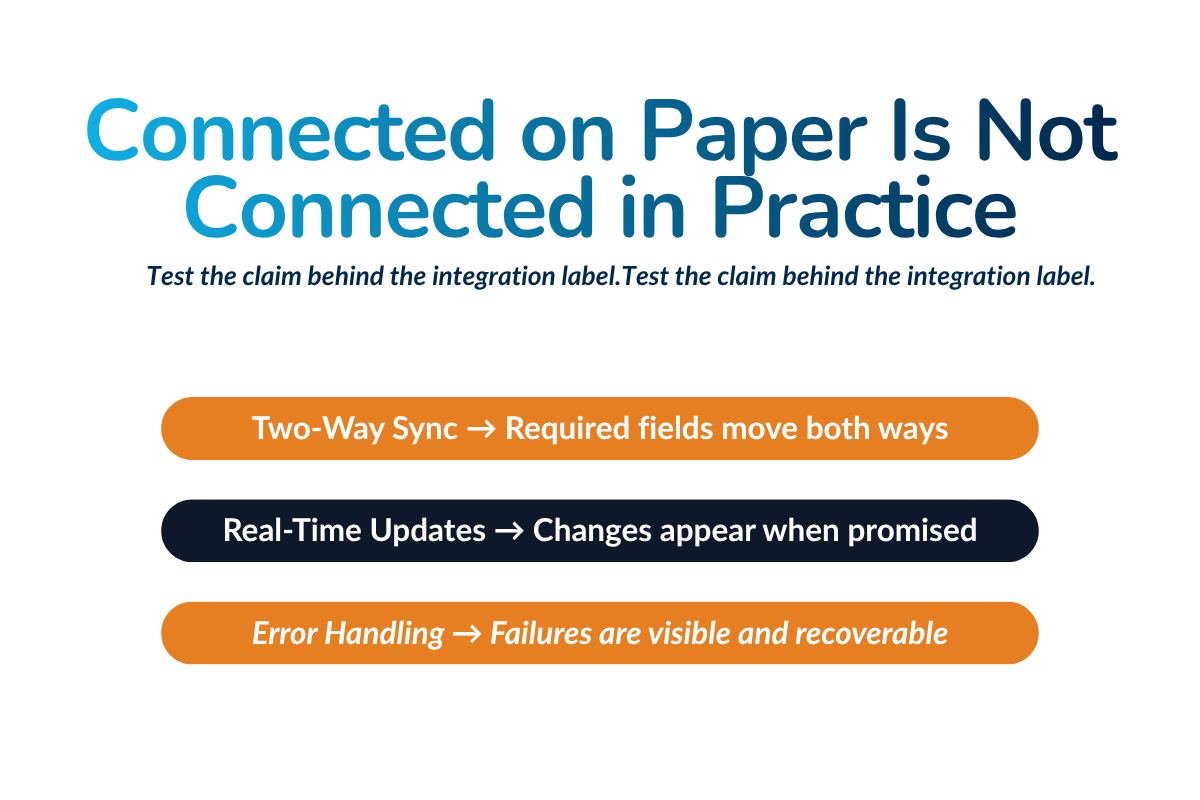
The workflow test confirms that information appears to move between systems. The next step is to verify exactly what transfers, how errors are handled, and who controls the data.
Ask What Every Integration Actually Transfers
Create a separate integration checklist for every accounting, inventory, payment, financing, marketing, or communication tool the company plans to retain.
Confirm four areas:
- Data coverage: Which records, fields, attachments, and historical data transfer?
- Sync behavior: Is the connection one-way or two-way, and does it update instantly, on a schedule, or only when triggered manually?
- Data control: Which platform is the source of truth when the same record is edited in both systems?
- Exception handling: How are failed syncs, missing fields, conflicting updates, and duplicate data entry identified and corrected?
Do not assume that a two-way connection synchronizes everything. An integration may transfer customers and invoices in both directions while excluding job costs, attachments, refunds, taxes, or custom fields.
Confirm whether each connection is native, provided through a third party, built through an API, or limited to file exports. This determines who maintains it, whether development is required, and which vendor is responsible when the connection fails.
“QuickBooks integration” is not a complete answer. Ask the vendor to create a customer and job, produce an invoice containing taxes and job costs, record a payment, and transfer the transaction into QuickBooks Online or the company’s existing accounting software. Then edit one record or create a duplicate to see how the accounting system handles the change and how employees are alerted.
Pass/fail question: Can the vendor show exactly which data moves, where it moves, when it moves, and what happens when the connection fails?
Confirm Data Ownership and Export Options
Accessing customer data inside the platform does not necessarily mean the company can retrieve it in a complete and usable form.
Confirm that the HVAC business can export:
- Customer and asset records: Customer information, locations, equipment, warranties, and service history
- Operational records: Work orders, schedules, job notes, photos, attachments, and technician activity
- Commercial and financial records: Pricebooks, service agreements, estimates, invoices, payments, and job-cost data
- Reporting and governance records: Reports, custom fields, record timestamps, and audit history
Ask for a sample export before signing the contract. Check whether the data retains the relationships between customers, locations, equipment, jobs, invoices, and attachments. A collection of separate spreadsheets may contain the records but still be difficult and expensive to migrate into another platform.
Also verify:
- Are complete bulk exports available?
- Are record relationships, IDs, timestamps, and custom fields preserved?
- Are photos and attachments included?
- How long are data and read-only access available after cancellation?
- Do exports, temporary access, or migration assistance cost extra?
These terms should appear in the contract rather than depend on verbal assurances made during the sales process.
Pass/fail question: If the company ended the contract tomorrow, could it retrieve a complete, structured, and usable copy of its operational and financial history?
Evaluate Reporting, Operational Control, and Scalability
Once the workflows and data connections have been tested, evaluate whether managers can use the system to understand performance, control sensitive actions, and support a more complex operation.
These capabilities should be tested against real decisions and responsibilities, not the number of dashboards, permission settings, or users a vendor claims the platform can support.
Test Reports Against Real Business Decisions
Start with the questions managers regularly need to answer. Then ask the vendor to produce those answers inside the HVAC management software.
| Business Decision | Information Required |
|---|---|
| Which lead sources and service lines produce profitable work? | Booking rate, estimate conversion, average ticket, revenue, and gross margin by service type |
| Where is service performance declining? | Technician productivity, callbacks, first-time completion, and customer satisfaction |
| Are installations performing as estimated? | Labor, material, and equipment variance, job costing, and project profitability |
| Which customers or operations require attention? | Maintenance agreement renewals and performance by branch, department, technician, or commercial client |
Check whether managers can filter results by date, location, technician, service type, and department. A company operating residential service, commercial HVAC, and installations may need separate views for each division alongside consolidated reporting.
Every dashboard total should also lead to the underlying records. If a report shows declining gross margin, managers should be able to identify the specific jobs, cost categories, or pricing changes responsible. A total that cannot be traced back to its source is difficult to verify or act on.
Ask how each metric is defined. For example, determine whether average ticket includes canceled work, whether technician productivity measures revenue or completed jobs, and how callbacks are identified. Two platforms can use the same KPI label while calculating it differently.
Pass/fail question: Can a manager move from a high-level result to the specific jobs and cost drivers behind it without exporting the data into a spreadsheet?
Check Permissions and Accountability
Role-based permissions should reflect what each employee needs to do—not simply give every user broad access to the system.
Test controls across four areas:
- Pricing and sales: Pricebook changes, discounts, estimate revisions, and approval thresholds
- Payments and financials: Refunds, payment processing, job costs, and financial reports
- Customer and company data: Customer record edits, bulk changes, and data exports
- Administration: User creation, branch access, roles, and system configuration
Use actual test accounts during the demonstration. For example, have a technician attempt to edit the pricebook or issue a refund, then show how the request is blocked or routed for approval. Repeat the test with a manager account to confirm that authorized employees can complete the action without unnecessary workarounds.
The audit trail should show who created, edited, approved, or deleted a record, what changed, when it changed, and whether the original value and authorization remain visible.
This becomes increasingly important as HVAC companies add employees, departments, and locations. Without clear accountability, pricing changes, refunds, customer-data edits, and permission changes can be difficult to investigate.
Pass/fail question: Can the company limit sensitive actions by role and reconstruct who changed important operational or financial information?
Determine Whether the Platform Can Support Growth
Scalability involves more than adding user accounts. The management software must preserve visibility and control as the business adds technicians, service lines, and locations.
Give the vendor a realistic future-state scenario, such as doubling the field team, opening a second branch, or adding a commercial service division. Ask how the platform would handle the additional users, workflows, pricebooks, permissions, customer locations, and local and company-wide reporting.
Check whether each branch can maintain the controls it needs while leadership retains centralized reporting. Adding a location should not require a separate customer database, another set of disconnected tools, or extensive manual consolidation.
Small HVAC businesses should not buy enterprise complexity for hypothetical expansion, but growing HVAC businesses should avoid a platform that requires replacement as soon as they add a branch or service division.
Pass/fail question: Can the platform add teams, divisions, and locations without fragmenting customer data, permissions, workflows, or reporting?
Calculate the Total Cost of Ownership
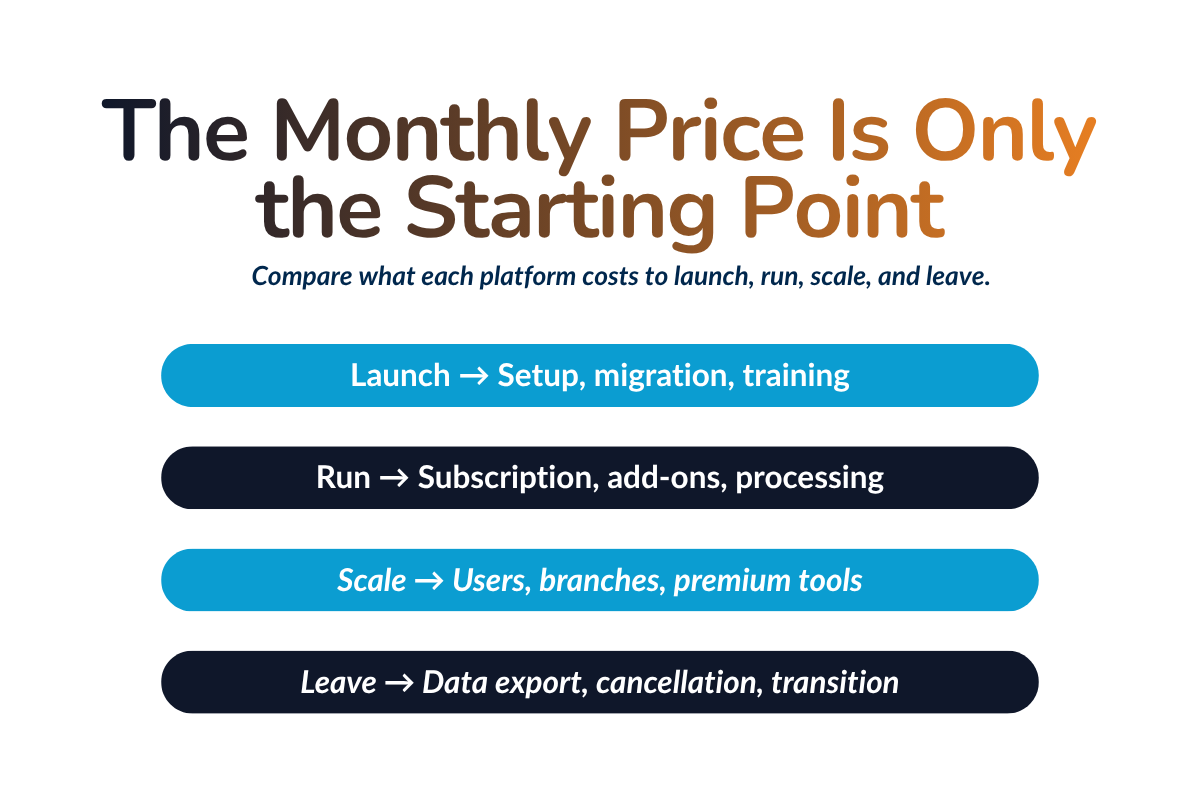
The advertised monthly subscription rarely reflects what an HVAC company will actually spend. Two HVAC software solutions may display similar base prices while differing significantly in implementation, required add-ons, payment-processing fees, support, and the cost of adding employees or locations.
Calculate every option using the same operating assumptions rather than comparing headline prices.
Total Cost of Ownership = Subscription + Implementation + Migration + Training + Add-Ons + Integration Fees + Payment Processing Fees + Hardware + Internal Administration Costs
Separate the costs into four categories:
| Cost Category | What to Include |
|---|---|
| Platform access | Paid-user definitions, minimum user requirements, monthly or annual billing, and separate charges for office employees, technicians, administrators, or branches |
| Deployment | Implementation, data migration, configuration, initial training, and employee time spent preparing and validating the system |
| Functionality and support | Premium mobile app or reporting functions, integrations, API access, automation modules, support packages, and future employee training |
| Usage and infrastructure | Payment-processing rates, chargebacks, card readers, mobile devices, data plans, and other required hardware |
- Confirm who counts as a paid user, whether minimum licenses apply, and how office employees, technicians, administrators, and branches are priced. Also separate the billing frequency from the contract term and verify whether licenses can be reduced when staffing changes.
- Determine which migration, configuration, testing, and training services are included. “Free implementation” may still create substantial internal costs if employees must clean data, rebuild pricebooks, configure workflows, and validate integrations themselves.
- Model payment-processing costs using the company’s actual card and ACH volume, including percentage fees, fixed charges, refunds, chargebacks, devices, payout fees, and any required processor.
- Compare costs for the current operation, a one-year growth projection, and a realistic three-year expansion scenario.
- Include renewal pricing, expected rate increases, contract length, cancellation terms, and any fee for exporting data or ending service.
A platform that appears affordable in year one may become substantially more expensive when the company adds technicians, enables necessary integrations, or moves into a higher service tier.
Present each vendor’s total as a one-year and three-year cost rather than a monthly subscription. This gives HVAC businesses a comparable view of the full financial commitment and prevents required functions from being treated as unexpected expenses after implementation.
Pass/fail question: Can the vendor provide a written cost model showing what the company will pay today, at renewal, and after adding the users, branches, and capabilities included in its growth plan?
Evaluate Implementation, Training, and Support
After calculating implementation costs, evaluate whether the vendor has a credible plan for completing the work without disrupting operations.
Define Who Owns Migration and Configuration
Request a written implementation plan showing who will clean, map, import, and validate existing data; configure workflows, pricebooks, permissions, and accounting integrations; and approve the final setup.
Confirm which records cannot be migrated and whether a test migration is included. The plan should also explain whether both systems will run in parallel and what happens if testing fails or the launch date slips.
Review Training by Role
Training should reflect how each group uses the platform. Office employees need customer intake and scheduling training, technicians need practical mobile app training, managers need reporting and approval workflows, and accounting employees need invoicing and reconciliation guidance.
Confirm whether training is live or recorded, included or paid, and available for future employees—not only the original implementation team.
Investigate Ongoing Support
Check support hours, available channels, response targets, and escalation procedures for urgent issues. Also confirm whether dedicated assistance continues after launch or ends with onboarding.
A responsive salesperson during a free demo does not prove that post-sale support will be equally reliable. Ask for implementation, training, and ongoing support commitments in writing.
Run a Workflow-Based Demo and Vendor Comparison
Give Every Vendor the Same Scenarios
Give every vendor the same scenarios defined earlier in the guide, including at least one exception or failure condition. Require each vendor to complete the workflows live rather than describe what the software should do.
Include the People Who Will Use the Software
Use the same cross-functional employees who helped define the requirements. Each person should complete the tasks they perform rather than simply watch the vendor’s presentation.
When possible, use a trial account with representative customer and job data. This provides a more accurate view of usability than a vendor-controlled demo.
Score What the Vendor Demonstrates
Score each platform on workflow fit, mobile usability, customer management, integrations, reporting, job costing, implementation, total cost, and scalability.
Use a consistent scale:
0 = unavailable; 1 = promised; 2 = requires major customization; 3 = works with limitations; 4 = meets the requirement; 5 = demonstrated successfully from beginning to end.
Weight must-haves more heavily and record the evidence behind every score. Treat vague integration claims, undisclosed add-ons, roadmap-dependent features, restricted technician access, unclear export policies, and missing implementation or pricing details as red flags.
See How HVACBase Handles the Full Service Workflow
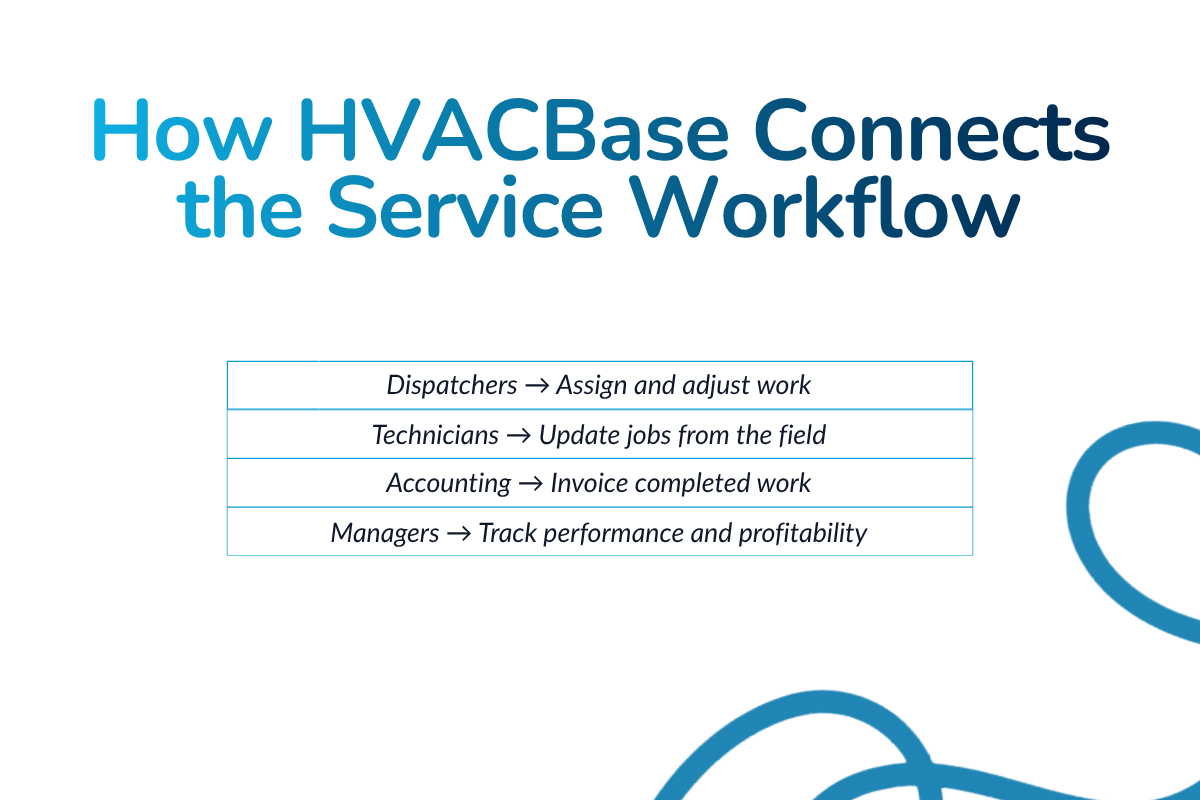
HVACBase connects customer, equipment, scheduling, field-service, estimating, invoicing, and job information across the service workflow.
- Respond faster: Connect customer requests and customer management with scheduling and HVAC dispatch software.
- Keep field and office teams aligned: Use offline mobile work, digital work orders, field updates, and real-time office synchronization.
- Move approved work forward: Carry estimates into repair or installation coordination, inventory management, invoicing, and payment processing.
- Stay ahead of recurring work: Manage service agreements and monitor operational performance through connected reporting.
Use the same workflow scenarios and pass/fail questions from this guide to compare HVACBase with other vendors based on demonstrated performance.
The Bottom Line—Buy for the Work After the Demo
The best HVAC service software is not the platform with the longest feature list or smoothest presentation. It is the system that supports the company’s real workflows, employees, integrations, and growth after the sales call ends.
Base the final decision on live workflow evidence, hands-on employee testing, written costs, and clearly assigned implementation responsibilities.
See HVACBase Handle Your Service Workflow
Bring the scheduling, dispatch, field service, invoicing, or service agreement workflow you need to improve. See how HVACBase handles it from start to finish—including the handoffs and exceptions that matter after the demo.
Frequently Asked Questions
What Should I Look for in HVAC Service Software?
Prioritize workflow fit, mobile usability, scheduling, dispatch, customer management, invoicing, reporting, integrations, implementation support, and total cost.
What Questions Should I Ask During an HVAC Software Demo?
Ask the vendor to complete your real workflows live, including exceptions. Also verify integrations, offline access, data exports, implementation responsibilities, support, and full pricing.
What Is the Best HVAC Software for a Small Business?
The best HVAC software is one that meets current needs without unnecessary complexity and can support realistic growth. Focus on ease of use, essential workflows, support, and total cost.
How Much Does HVAC Business Software Cost?
Costs vary by users, features, and vendor. Compare subscriptions alongside implementation, migration, training, integrations, payment processing, hardware, support, and renewal pricing.
How Can I Evaluate an HVAC Software QuickBooks Integration?
Test how customers, invoices, payments, taxes, and job costs synchronize. Confirm sync direction, timing, error handling, duplicate prevention, reconciliation, and support responsibilities.
.
Should HVAC Technicians Participate in the Evaluation?
Yes. Technicians should test the mobile app, work orders, offline access, field updates, estimates, invoices, and payment collection before the company commits.
Can Field Service Management Software Handle Both Service and Installation Work?
Some platforms can, but buyers should verify multi-day scheduling, crew coordination, inventory management, project stages, progress billing, change orders, and detailed job costing
Have questions or need personalized advice?
Talk to an Expert Today and let our construction specialists guide you to success.
Related Posts