
Smart HVAC Scheduling and Dispatch Software That Puts the
Right Tech on the Right Job Every Time
Double bookings, missed service calls, and technicians showing up to the wrong address don't just create frustration - they cost revenue and damage customer trust.
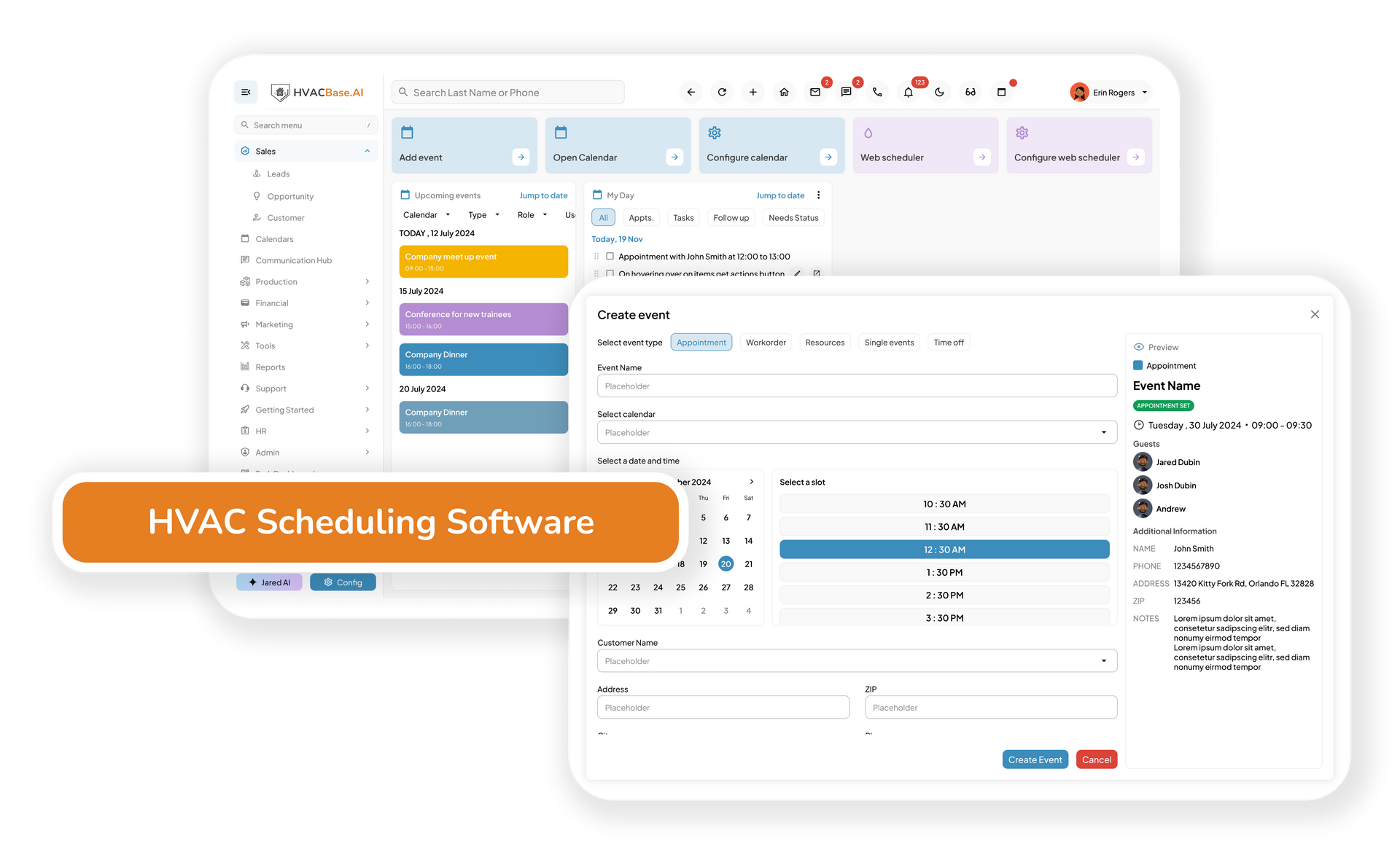
HVACBase replaces manual scheduling with a drag-and-drop dispatch system that assigns, tracks, and optimizes every HVAC job in real time.
- Drag-and-drop scheduling with conflict detection
- Real-time GPS technician tracking
- Auto-assign HVAC jobs by skill, certification, and availability
- Route optimization to complete more service calls per day
- Automated customer arrival notifications
- Mobile app for technicians in the field
Zero
double bookings with conflict detection
Real-time
GPS visibility across every technician
Less drive time
with automatic route optimization
"Our dispatch used to run through a group chat and a whiteboard. Techs were showing up late, sometimes to the wrong job entirely. Within a month of switching, our scheduling errors dropped to almost nothing and we started fitting more jobs into the day."
— Operations Manager, residential HVAC contractor
- The real problem
What Manual HVAC Scheduling Actually
Costs Your Business
Every scheduling error is a customer experience failure. Here's what that looks like without a proper system in place.
- Manual scheduling
- Jobs coordinated through calls, texts, and notepads
- Double bookings discovered only when a tech calls in
- No visibility into where technicians are during the day
- Routes planned manually, wasted drive time every day
- Customers calling to ask where their tech is
- Recurring maintenance jobs forgotten or booked late
- Preventive maintenance visits missed because service agreements are tracked manually
- HVACBase scheduling
- Drag-and-drop calendar with real-time team visibility
- Automatic conflict detection before a booking is confirmed
- Live GPS tracking of every technician on the map
- Optimized routes assigned automatically to reduce travel
- Automated arrival notifications sent directly to customers
- Recurring jobs scheduled automatically from service contracts
- Maintenance agreements automatically generate recurring service visits
Stop losing jobs to missed follow-ups, scattered customer records, and disconnected service history.
See how HVACBase CRM organizes your leads, automates your follow-ups, and gives your team full visibility into every customer relationship.
- Core features
Every Scheduling and Dispatch Tool Your
HVAC Team Needs
01 — Drag-and-drop scheduling board
Visualize your entire team's day on one calendar. Drag jobs between technicians, adjust times, and resolve conflicts in seconds, all without picking up the phone.
02 — Real-time GPS technician tracking
See exactly where every technician is during the day. Dispatch the closest available tech to urgent calls, monitor job progress, and update the office in real time without back-and-forth calls.
03 — Auto-assignment by skill and availability
Jobs are automatically matched to the right technician based on skill set, location, and current availability. No more manually checking who's free; the system does it instantly.
04 — Route optimisation
Automatically assigns the most efficient route to each technician at the start of the day. Less windshield time means more jobs completed per day and lower fuel costs across your fleet.
05 — Recurring job scheduling
Automatically schedule maintenance agreements, seasonal tune-ups, filter replacement visits, and recurring service plans. HVACBase creates the work order, assigns the technician, and sends customer reminders without manual intervention.
06 — Automated customer notifications
Send appointment confirmations, technician arrival updates, and service completion notifications automatically. Customers stay informed without calling your office for status updates.
07 — Mobile app for field technicians
Technicians see their full schedule, job details, and customer notes on their phone. They can update job status, log arrival and completion times, and flag issues, without calling the office.
08 — Connected to CRM, invoicing and reporting
Scheduling data flows automatically into your CRM, invoicing, and performance reports. A completed job triggers an invoice; no manual handoff between systems required.
Stop Losing Jobs to Scheduling Errors and Slow Dispatch
See how HVACBase puts the right technician on every job, keeps customers informed, and gives your office real-time visibility across the whole team.
Frequently Asked Questions
What is HVAC scheduling and dispatch software?
HVAC scheduling and dispatch software helps contractors assign jobs, schedule technicians, optimize routes, track field activity, and manage customer appointments from one platform. It replaces manual scheduling processes with real-time visibility across your entire operation.
How does HVACBase prevent double bookings?
HVACBase automatically checks technician schedules, availability, assigned jobs, and calendar conflicts before a new appointment is confirmed. Potential conflicts are identified immediately so dispatchers can resolve them before they impact customers.
Can HVACBase handle emergency service calls?
Yes. Dispatchers can see real-time technician locations and quickly assign emergency calls to the closest available technician. New jobs are instantly pushed to the technician's mobile app.
Does HVACBase automatically schedule maintenance agreements?
Yes. Maintenance agreements, seasonal tune-ups, recurring inspections, and preventive service visits can be scheduled automatically. The system creates work orders, assigns technicians, and sends reminders without manual scheduling.
Can customers receive appointment reminders and arrival updates?
Yes. HVACBase automatically sends appointment confirmations, reminders, technician arrival notifications, and service completion updates through email and SMS to improve customer communication and reduce missed appointments.
Does scheduling connect with CRM and invoicing?
Yes. Scheduled jobs are connected directly to customer records, service history, invoices, maintenance agreements, and reporting dashboards. There is no need to manually transfer information between systems.
Can technicians manage schedules from their phones?
Yes. HVAC technicians can view schedules, customer details, equipment history, service notes, and job updates through the HVACBase mobile app. They can also update job status and communicate with the office in real time.
Is HVACBase suitable for both small and large HVAC businesses?
Yes. HVACBase works for single-location contractors, growing service teams, and multi-location HVAC operations. The scheduling system scales as your business grows without requiring additional scheduling tools.