Top HVAC Dispatch Software for Fast-Growing Companies
November 19, 2025
Every job starts with a call, but as your service list grows, so does the work. Missed updates, double bookings, and late arrivals can start quietly, but they chip away at margins.
For customers, a delayed technician feels like a broken promise. For your team, it’s just another day playing catch-up.
That’s why more HVAC companies are investing in smarter dispatch systems. HVAC dispatch software replaces this struggle with structure, giving everyone, from the office to the field, a clear view of what’s next. It’s how teams handle more work without losing their grip on quality or time.
Top HVAC Dispatch Software for Fast-Growing Companies in 2026
As the HVAC Industry becomes more competitive, efficiency is no longer optional. The right dispatch software empowers businesses to do more with less: fewer scheduling conflicts, faster response times, and happier customers.
In the sections ahead, we’ll explore how modern tools simplify scheduling, optimize routes, and maintain tight communication, helping HVAC teams scale efficiently and grow.
Key Takeaways
- The right HVAC dispatch software helps you assign jobs faster, reduce scheduling errors, and keep every technician on track.
- Automated dispatching enhances customer satisfaction by reducing wait times and minimizing missed appointments.
- Integrated HVAC software brings together field and office teams, ensuring that updates and job details are stored in one place.
- Choosing the right platform depends on your company's size, budget, and the features that fit your daily operations.
Want to See Dispatch Done Right?
Experience how HVACBase brings structure, speed, and clarity to your daily operations. It’s built to help growing HVAC teams stay efficient and organized.
Explore HVACBase dispatch software and see why HVACBase stands out.
What Is HVAC Dispatch Software?

The Core Idea: HVAC dispatch software is the system that keeps your field operations organized. It assigns technicians to jobs, tracks their schedules, and updates everyone in real time, without the need for phone calls or maintaining manual notes.
How It Fits into the Bigger Picture: It’s a key part of both HVAC service software and field service management software. Together, these tools handle scheduling, invoicing, and performance tracking, providing HVAC techs with a clear view of their entire workflow from a single dashboard.
What It Automates:
- Job details: Work orders, assigned tech, location, and time.
- Customer information: Contact details, service history, and notes.
- Real-time data: Updates from the field as jobs start, progress, and close.
While scheduling and dispatching work together, they serve different purposes. HVAC scheduling focuses on planning appointments, managing technician availability, and organizing service calendars. HVAC dispatching puts those plans into action by assigning jobs, communicating updates to technicians, and handling urgent calls or last-minute changes.
Explore how HVAC scheduling and dispatch software connects technician assignments, routing, and job updates.
Why Dispatch Efficiency Matters for Scaling HVAC Companies

In the HVAC business, dispatch efficiency can be the difference between steady growth and constant firefighting.
When your operations are well-organized, technicians spend more time fixing systems and less time waiting for instructions, which boosts customer satisfaction and keeps your schedule full.
- The Hidden Costs of Poor Dispatching: If your dispatch process isn’t streamlined, you’ve probably felt the pain already: overlapping routes, missed appointments, or misplaced customer details. These issues not only waste time but also frustrate clients and eat into your bottom line.
- The Power of Smart Technician Routing: Every extra mile on the road is lost time that could’ve been spent on another job. Optimized routing helps reduce travel time, fuel costs, and driver fatigue, allowing your technicians to complete more calls per day without feeling overworked.
- Bridging the Communication Gap: When office staff and field teams aren’t on the same page, things fall through the cracks. With the right HVAC field service management software, dispatchers can quickly assign the right technician, check availability, and share updates in real time.
Benefits of HVAC Dispatch Software for Growing Businesses

As your business grows, managing schedules, customer details, and technician routes manually can slow everything down. HVAC dispatch software eliminates that friction, helping you scale efficiently while maintaining high service quality.
1. Smarter Time Tracking
When every minute counts, precision matters. HVAC dispatch software automatically logs when technicians start and finish jobs, eliminating manual entry errors. These insights reveal productivity trends and help managers optimize schedules without constant oversight.
2. Actionable Performance Insights
Dispatch dashboards help managers track response times, completed jobs, technician availability, and scheduling delays. These insights make it easier to identify bottlenecks and improve daily dispatch decisions.
3. Better Technician Utilization
By coordinating job assignments, technician availability, and routes, HVAC dispatch software reduces idle time and unnecessary travel. This helps teams complete more service calls without overloading technicians or increasing administrative work.
What to Look for in HVAC Dispatch Software
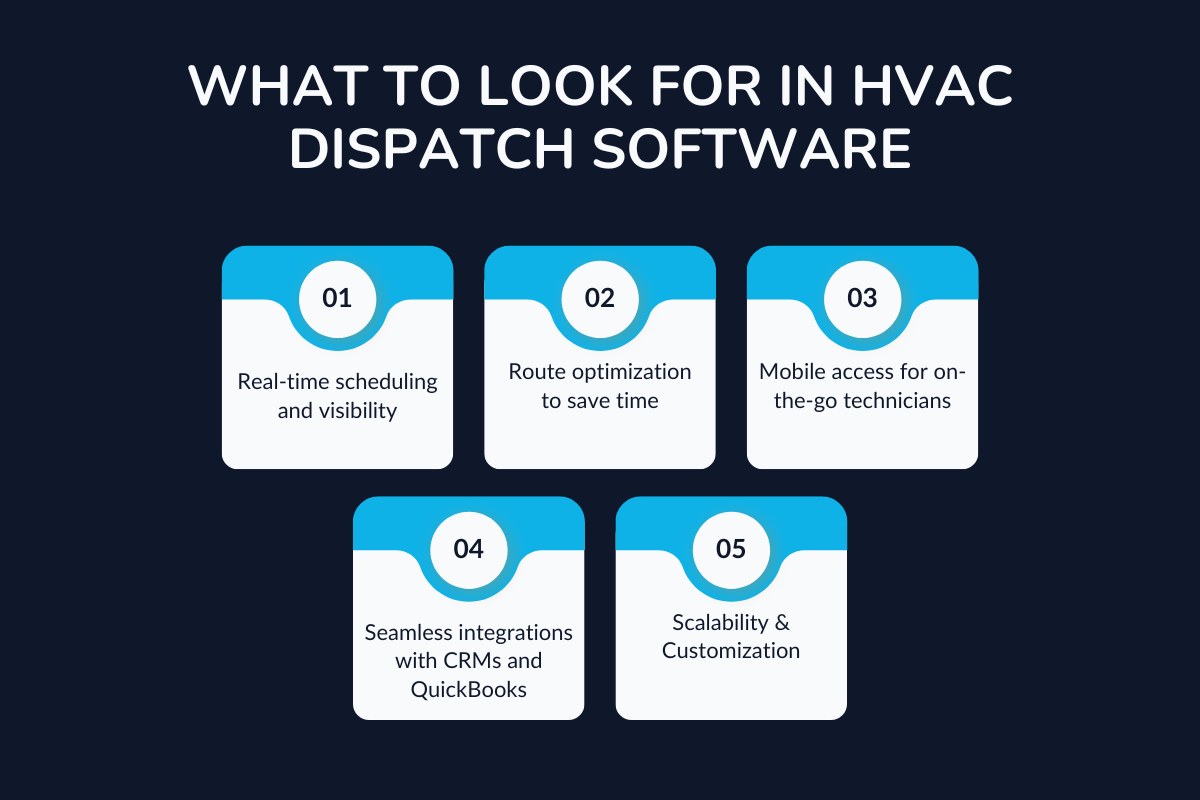
As HVAC businesses expand, the right dispatch software becomes crucial for managing growing workloads, enhancing technician performance, and maintaining customer satisfaction.
The best platforms combine flexibility, automation, and real-time insights to keep every part of your operation in sync.
1. Real-Time Scheduling and Visibility
Modern HVAC technician dispatch tools allow instant job assignments and technician tracking from a single dashboard. Real-time visibility helps prevent overlapping appointments and ensures dispatchers can respond efficiently to incoming service requests.
2. Route Optimization That Saves Time
Smart routing is key to profitability. HVAC field service software plans technician routes based on distance, skills, and job priority, reducing travel time, cutting fuel costs, and enabling more daily service calls.
3. Mobile Access for Field Technicians
A strong mobile app keeps technicians and HVAC contractors fully aligned. Field staff can update job progress, share photos, and access customer records instantly, keeping the back office informed in real time.
4. Seamless Integrations
Select software that integrates smoothly with your HVAC invoicing software, CRM, and accounting tools. Integrated systems remove duplicate data entry and ensure consistent information from scheduling to payment.
5. Scalability and Customization
Your dispatch solution should grow as your business does. Scalable field service management tools make it easy to add users, customize workflows, and maintain high performance even as call volume increases.
Ease of adoption matters as your business grows. Look for software with a straightforward onboarding process, practical training for dispatchers, and an intuitive mobile app technicians can learn quickly. An easy-to-implement platform helps new team members get up to speed without disrupting daily service operations.
6. Insightful Reporting
Comprehensive dashboards reveal technician performance, job completion rates, and operational bottlenecks. With real-time data at your fingertips, you can make faster, more informed business decisions that drive customer satisfaction.
Check out: Must-Have Features of HVAC Business Software
Top 7 HVAC Dispatch Software for Small Businesses
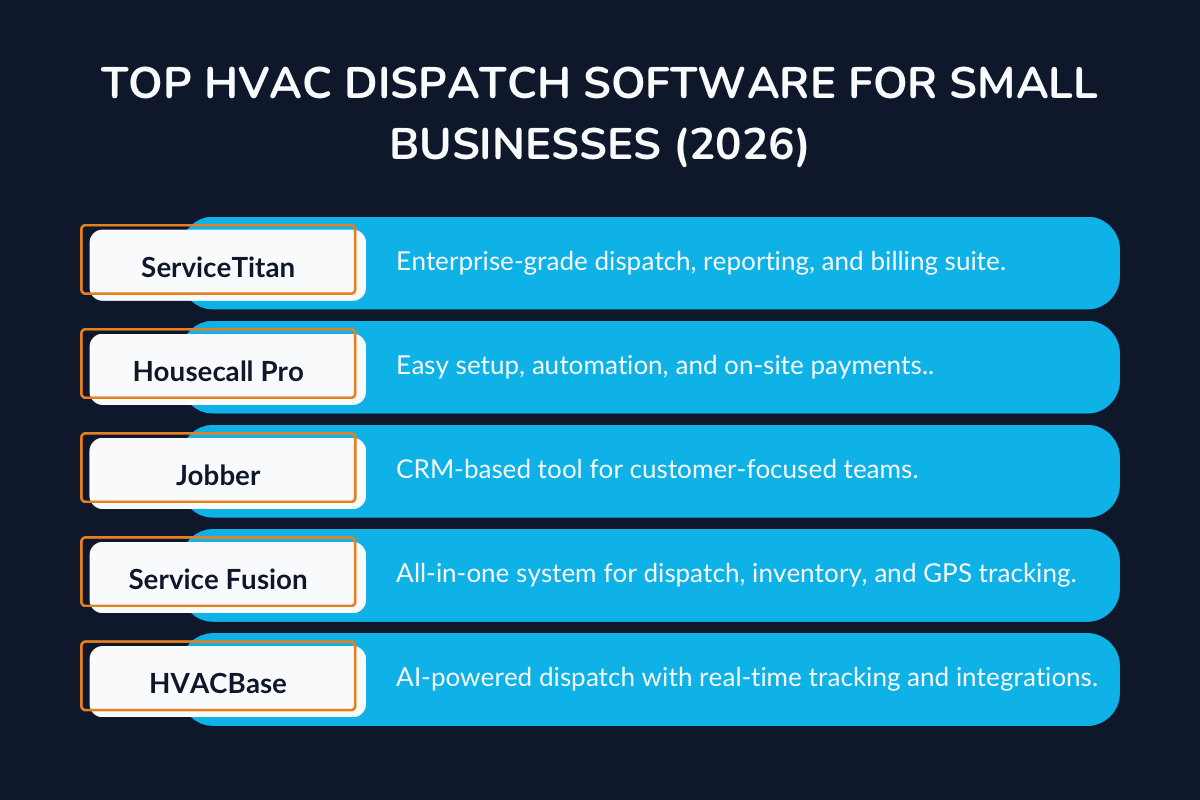
As your HVAC company grows, handling more service calls means coordinating schedules, routes, invoices, and customer updates at speed.
The right dispatch platform centralizes this work, so teams complete more jobs with the same resources. Below are leading options that help HVAC businesses scale efficiently and deliver consistent results.
1. HVACBase
HVACBase is an AI-assisted HVAC platform that automates dispatch, centralizes customer records, and provides real-time route/status tracking with key integrations.
Best for: Growing HVAC teams that want structure without complexity.
Key features:
- AI-powered dispatching: The system intelligently matches technicians to jobs based on their skill sets, current location, and availability, ensuring the right person is sent to the right task every time.
- Customer management: A built-in customer management system keeps all client data, from contact information to service history and past invoices, organized in one place
- Real-time data: Real-time data visibility is a game-changer for HVAC businesses. Managers can monitor active jobs, technician routes, and task progress from a single dashboard.
- Integrations: Seamless integrations connect your dispatch software with popular accounting and CRM tools, such as QuickBooks, Xero, and HubSpot. Works with billing and CRM tools to close jobs faster.
Why it works: Designed for speed and clarity, helping expanding teams manage workload and maintain service quality.
Pricing: Contact HVACBase for a personalized quote based on your team's needs.
2. Housecall Pro
Housecall Pro is an easy-to-adopt field service software with automated reminders, on-site payments, and streamlined scheduling for small to midsize HVAC teams.
Best for: Small to mid-size HVAC businesses that want an easy setup.
Key features:
- Automation: Automation ensures that no detail is ever missed. The system automatically sends appointment reminders, job status updates, and service renewal notifications to both customers and technicians.
- Payments: With built-in payment processing, technicians can close jobs and collect payments right from the field using their mobile devices.
- Scheduling: Office managers can assign jobs in seconds using a drag-and-drop interface that displays technician availability, skill sets, and location.
- Customer communication: Clients receive instant updates about appointment confirmations, technician arrivals, and service completions, without needing to call the office.
Why it works: Simplifies the entire process from booking to billing without needing extra staff or systems.
Pricing: Basic $59/month (annual) or $79/month (monthly); Essentials $149/month (annual) or $189/month (monthly); MAX is $299/month (annual) or $329/month (monthly); 14‑day free trial.
3. Jobber
It is a customer-centric service management tool with strong CRM, quotes-to-invoice workflows, and calendar sync to support repeat maintenance work.
Best for: Teams focused on customer experience and repeat service calls.
Key features:
- CRM dashboard: Jobber’s built-in CRM dashboard keeps all customer information in one easy-to-access place. You can view complete service histories, notes from previous jobs, and active quotes.
- Estimates and invoicing: You can generate professional estimates, send them to customers, and convert approved quotes directly into invoices, all within the same platform.
- Sync: Works with QuickBooks and Google Calendar job import.
Why it works: Keeps office staff and technicians aligned, ensuring every customer interaction is tracked and professional.
Pricing: Jobber offers Core, Connect, Grow, and Plus plans. Core starts at $29/month with annual billing ($49/month without a commitment). Pricing increases with additional users and features. Promotional rates may also apply.
4. Service Fusion
It is an all-in-one operations suite unifying dispatch, inventory, estimates, invoicing, GPS tracking, and role-based permissions.
Best for: HVAC companies that want an all-in-one operational tool.
Key features:
- Unified system: With everything- dispatching, inventory management, estimates, and invoicing under one platform, teams can work seamlessly from start to finish.
- Tracking: Dispatchers can view technician locations on live maps, monitor job progress, and optimize routes to reduce travel time and fuel costs.
- Permissions: The system lets administrators assign role-based access levels for office staff, managers, and field technicians.
Why it works: Reduces the need for multiple tools and provides full visibility across projects.
Pricing: Service Fusion offers Starter, Plus, and Pro plans with flat-rate pricing and unlimited users. Monthly and annual billing options are available. Check the official pricing page for the latest subscription rates.
5. ServiceTitan
ServiceTitan is an enterprise-grade field service platform that combines advanced dispatch, call tracking, accounting integrations, and in-depth reporting for high-volume HVAC operations.
Best for: Large HVAC enterprises and multi-location service providers.
Key features:
- Scheduling and dispatching: Real-time drag-and-drop board for assigning jobs. This eliminates double bookings and reduces idle time.
- Integrations: Built-in QuickBooks sync and phone call tracking. You can also track customer calls directly within the platform—every inquiry, quote request, and service call is logged automatically, giving you complete visibility over leads and client communication.
- Insights: Custom reports on job completion rates and technician performance. With these insights, you can identify trends, spot inefficiencies, and make informed decisions.
- Mobile access: Mobility is crucial for modern HVAC teams. A dedicated field service app lets technicians view schedules, update work orders, and upload photos or signatures directly from the job site.
Why it works: Combines dispatch, billing, and reporting in one platform, ideal for data-heavy teams managing high job volumes.
Pricing: Custom quote based on the number of technicians and selected package. ServiceTitan offers Starter, Essentials, and The Works plans, with pricing available upon request.
6. FieldEdge
FieldEdge is a field service management platform designed for HVAC businesses managing multiple technicians, service vehicles, and daily appointments. It combines scheduling, dispatching, customer management, and accounting integrations to help contractors coordinate field operations from one system.
Best for: Mid-sized HVAC contractors and multi-truck service businesses that need advanced dispatching and QuickBooks integration.
Key features:
- Smart scheduling and dispatching: A drag-and-drop dispatch board helps managers assign service calls based on technician skills, availability, and location. Real-time updates make it easier to handle emergency jobs and last-minute schedule changes.
- GPS tracking and route optimization: Map-based scheduling provides visibility into technician locations and helps dispatchers plan efficient routes, reducing unnecessary travel.
- Mobile access: Technicians can access work orders, customer histories, and job details from the field while updating their job status in real time.
- QuickBooks integration: Accounting integration connects field operations with invoicing and financial records, reducing duplicate data entry.
Why it works: FieldEdge combines dispatching, technician tracking, and accounting connectivity, making it suitable for HVAC businesses managing several trucks and service territories.
Pricing: Custom quote based on business requirements and selected features.
7. FieldPulse
FieldPulse is an all-in-one field service management platform that helps HVAC contractors organize scheduling, dispatching, job management, and customer communication. Its mobile-friendly tools keep office teams and field technicians connected as appointments and service priorities change throughout the day.
Best for: Small to mid-sized HVAC businesses that need flexible scheduling, real-time technician updates, and mobile dispatch capabilities.
Key features:
- Drag-and-drop scheduling: A visual scheduling board allows dispatchers to assign, reschedule, and manage jobs across technicians and service teams.
- GPS tracking and route optimization: Real-time technician locations help dispatchers identify available technicians, adjust routes, and respond quickly to urgent service calls.
- Mobile access: Technicians can view assigned jobs, access customer information, and update work orders directly from their mobile devices.
- Customer communication: Automated notifications keep customers informed about appointment times, technician arrivals, and job updates.
Why it works: FieldPulse connects scheduling, dispatching, and field communication in one platform, helping growing HVAC teams manage changing workloads without relying on disconnected tools.
Pricing: Custom, seat-based pricing depending on team size, user access, and selected features. Contact FieldPulse for a quote.
| Software | Best For | Key Features | Pricing | Integrations |
|---|---|---|---|---|
| HVACBase | Expanding HVAC startups | AI-powered dispatch, analytics dashboard | Custom quote | QuickBooks, Xero |
| Housecall Pro | Small to mid-size teams | Automation, invoicing, and payments | Starts ~$59/month | QuickBooks Online, Google Calendar |
| Jobber | Customer-focused businesses | CRM, estimates, client reminders | Starts ~$29/month | QuickBooks Online, Mailchimp (plan-dependent) |
| Service Fusion | Growing service firms | Inventory, scheduling, analytics | Custom quote | QuickBooks Online & Desktop |
| ServiceTitan | Large enterprises | Advanced dispatching, reporting, and mobile app | Custom quote | QuickBooks Online/Desktop, Xero, Sage Intacct |
| FieldEdge | Mid-sized HVAC contractors and multi-truck operations | Drag-and-drop dispatch, technician matching, GPS tracking, route optimization, mobile work orders | Custom quote | QuickBooks Online & Desktop, FleetSharp, Sage Intacct |
| FieldPulse | Small to mid-sized HVAC teams needing mobile-first dispatch | Drag-and-drop scheduling, real-time job updates, GPS tracking, route optimization, customer notifications | Custom, seat-based pricing | QuickBooks, Google Calendar, Zapier, CompanyCam |
Key Factors to Consider When Buying HVAC Software:
- Integrations: QuickBooks or accounting links simplify invoicing and payroll.
- CRM Features: Help track repeat customers and service history for better services.
- Appointment Booking: Online booking reduces missed calls and streamlines scheduling, especially helpful for a small business with limited staff.
- Scalability: Make sure the system can handle more technicians, service calls, and data as your company grows.
How to Test and Get the Most From HVAC Dispatch Software
1. Train Your Team. Not Just the Dispatcher
A system is only as good as the people using it. Make sure technicians know how to update job status, log time accurately, and use in-app communication. Consistent updates keep everyone aligned and prevent confusion during busy days.
2. Automate Wherever Possible
Utilize automation for routine tasks, including notifications, recurring jobs, and route optimization. The less manual work your team handles, the more time they have to deliver great service and grow your customer base.
3. Monitor and Measure Efficiency
Don’t rely on assumptions. Track job completion times, cancellations, and response rates to spot bottlenecks. Over time, these numbers will show where your dispatching process saves time, and where it still needs improvement.
4. Test the Dispatch Workflow Before Buying
Before committing to HVAC dispatch software, use a free trial or product demo to test how it handles real-world service scenarios:
- Emergency job assignment: Check how quickly dispatchers can identify an available technician and assign an urgent service call without disrupting existing appointments.
- Last-minute rescheduling: Test whether changing an appointment automatically updates technician schedules and sends customers timely notifications.
- Mobile job completion: Have a technician access job details, update service status, and complete a work order through the mobile app.
These tests help identify usability gaps and determine whether the software can support your team's daily dispatching needs.
Conclusion
The right HVAC dispatch software does more than organize schedules. It gives your team the structure and visibility needed to scale.
By using an HVAC service software that brings communication and analytics into one place, you reduce delays, improve technician efficiency, and strengthen your reputation with every completed job.
Ready to simplify dispatching with HVACBase?
Claim your custom demo with HVACBase today and see how HVAC scheduling and dispatch workflows can turn coordination challenges into growth opportunities.
FAQs
What does HVAC dispatch software do?
It automates job scheduling, technician assignments, and communication between office and field teams, helping HVAC business owners stay organized and responsive.
How can dispatch automation improve customer satisfaction?
By reducing wait times, providing real-time updates, and ensuring technicians arrive prepared, automation directly improves customer satisfaction and service reliability.
Which HVAC dispatch software offers mobile access for technicians?
HVACBase, ServiceTitan, Housecall Pro, Jobber, Service Fusion, FieldEdge, and FieldPulse all offer mobile access for field technicians. Depending on the platform and plan, technicians can view assigned jobs, access customer information, receive schedule updates, and update work order statuses directly from their smartphones. When comparing options, prioritize ease of use, real-time synchronization, and mobile features that support your team's daily workflows.
What features should HVAC companies look for?
Look for scheduling tools, route optimization, QuickBooks integration, and strong reporting capabilities. The best HVAC dispatch software combines these essentials to keep your operations running smoothly.
Have questions or need personalized advice?
Talk to an Expert Today and let our construction specialists guide you to success.
Related Posts